

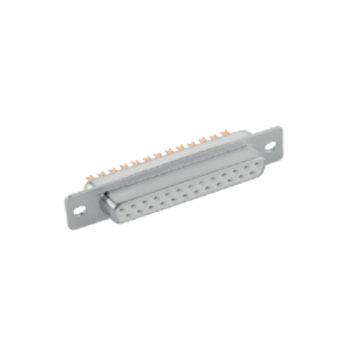
As someone who has been working in the D-Sub connector industry for years, I often get asked: "What's the real difference between DB37 and DB25? Which one should I choose?" Today, I’ll break it down in the simplest way possible so you can fully understand these two common types of D-subminiature connectors.
1. What Exactly Are DB37 and DB25?
First, let’s start with the basics. D-Sub Connectors (also called D-Subminiature Connectors) are widely used in electronic devices, named for their distinctive D-shaped metal shell. The numbers "25" and "37" refer to the number of pins—DB25 has 25 pins, while DB37 has 37 pins.
But here’s the thing: the pin count is just the surface-level difference. The real key lies in their design philosophy and application scenarios!
2. Pin Arrangement & Physical Size Comparison
DB25 Pinout Layout
The DB25 is one of the most common D-Sub connectors, featuring a two-row pin design:
-
Top row: 13 pins
-
Bottom row: 12 pins
This design allows it to provide sufficient connection points in a compact space, making it ideal for older printers and serial communication interfaces.
DB37 Pinout Layout
The DB37, on the other hand, uses a three-row pin design:
-
Top row: 13 pins
-
Middle row: 12 pins
-
Bottom row: 12 pins
The extra row of pins means the DB37 offers more connectivity options without increasing width—perfect for high-density signal transmission applications.
Fun Fact: Even though the DB37 has 12 more pins than the DB25, their widths are almost identical! That’s the beauty of D-Sub connector design—increasing pin count by adding rows rather than just expanding the shell size.
3. Industrial Use Cases: DB25 vs. DB37
Typical Applications of DB25
-
Serial Communication: Though less common now, DB25 was once the standard for RS-232 communication.
-
Printer Connections: Older parallel printer ports often used DB25.
-
Industrial Control: Some PLCs and industrial equipment still rely on DB25 for control signal transmission.
Typical Applications of DB37
-
High-Density Signal Transmission: When multiple signals need to be transmitted simultaneously.
-
Specialized Industrial Equipment: Certain test & measurement devices and medical equipment prefer DB37.
-
Custom Solutions: When standard interfaces aren’t enough, DB37 provides extra flexibility.
"Wait," you might ask, "if DB37 has more pins, why not just use it everywhere?"
Great question! It’s like asking, "Why don’t all cars use the most powerful engines?" More pins mean:
-
Higher cost
-
Larger size (though width is similar, thickness usually increases)
-
More complex wiring
-
Not all applications need that many connection points
4. Frequently Asked Questions (FAQs)
Q: What’s the difference between a D-Sub male connector and a D-Sub female connector?
A: Simply put, the male connector has pins, while the female connector has sockets. The choice depends on your device’s interface.
Q: When should I choose a High Power D-Sub Connector?
A: If your application requires higher current transmission, a standard D-Sub might not be enough. High Power D-Sub connectors use thicker pins and special materials to handle greater current loads.
Q: What type of D-Sub should I use outdoors?
A: For damp or dusty environments, go for an IP67 D-Sub or waterproof D-Sub connector, which offer superior dust and water resistance.
Q: How do I choose between DB9, DB15, DB25, and DB37?
A: It depends on your signal needs. DB9 is great for simple serial communication, DB15 is common in game controllers and some video interfaces, DB25 works for mid-level complexity, and DB37 is best for high-density signal transmission.
Q: What’s the difference between a Power D-Sub and a standard D-Sub?
A: Power D-Subs are built for power transmission, with sturdier construction and larger conductors to handle higher currents.
5. Practical Selection Tips
After years of working with different D-Sub connectors, here’s what I recommend when choosing:
-
Define Your Needs First: How many signal paths do you need? Is it for signals or power? What’s the operating environment?
-
Plan for Future Expansion: If your system might upgrade later, leaving spare pins is smart.
-
Don’t Compromise on Quality: Cheap connectors can lead to signal loss, poor contact, and failures.
-
Match the Connector to the Environment: For harsh conditions (humidity, dust, vibration), choose IP67-rated or waterproof D-Subs.
Remember: There’s no "best" connector—only the right one for your application!
6. Final Thoughts
Every time I see a customer struggling because they picked the wrong connector, it pains me. The truth is, DB25 and DB37 are like different tools in a toolbox—a screwdriver and a wrench each have their place. The key is using the right one for the job.
If you’re still unsure which D-Sub connector to choose, ask yourself:
-
How many connection points does my device actually need?
-
Is the operating environment harsh?
-
Will I need to expand in the future?
I hope this guide helps clear things up. If you have more questions, feel free to reach out—after all, helping customers find the perfect connector solution is what makes this job rewarding!
(By the way, if you need expert advice, our team is always here to analyze your specific needs—because when it comes to D-Subs, the details make all the difference!)